

Before You Start
- This guide covers general, high-level direction. For specific or unusual use cases, or before selecting a fisheye, varifocal, or PTZ camera, consult a Worlds Solutions Architect.
- The core principle throughout: image quality drives detection accuracy. Every choice below, resolution, lens, distance, mounting, ultimately comes back to how many pixels represent your object of interest.
Choosing the Right Camera Type
- Fixed lens - simple, affordable, a consistent view. Best for general-purpose applications and most standard deployments. Most Worlds customers use fixed-lens, 1080p cameras.
- Fisheye - extremely wide coverage, up to 360°, but with reduced pixel density and noticeable distortion. Best for compact areas where only large objects or general activity need monitoring. Consult a Worlds Solutions Architect before selecting this type.
- Varifocal - adjustable, true optical zoom (unlike a fixed lens’s digital zoom, which only enlarges the image without adding detail). Best for situations needing both wide and close-up views. Uncommon; consult a Worlds Solutions Architect.
- PTZ - remote pan, tilt, and zoom control from a single device, covering multiple areas. Best for dynamic camera views, or where PTZ hardware is already deployed for other operational purposes. Consult a Worlds Solutions Architect before selecting this type.
- Thermal - detects temperature variation rather than visible light, giving visibility in total darkness or through smoke. Best for specialized cases: liquid leak detection, defect identification, or monitoring materials with distinct thermal properties.
The Core Relationship: Distance, Resolution, and Object Size
Worlds’ ability to recognize and track an object depends on pixel density, the number of pixels representing that object per foot (or meter) of the scene. Too few pixels, and the AI can’t confidently distinguish details. Too many, and you’re overspending on compute or introducing detection latency. Example, using a 1080p camera (1920 px wide):- 20 ft scene width -> 96 px/ft (fine detail)
- 40 ft -> 48 px/ft (people tracking)
- 80 ft -> 24 px/ft (vehicle detection)
- 160 ft -> 12 px/ft (motion only)
- Large objects (vehicles, equipment): 20-40 px/ft
- People or medium-sized objects: 40-80 px/ft
- Small or detailed objects (hands, labels, tools): 100+ px/ft
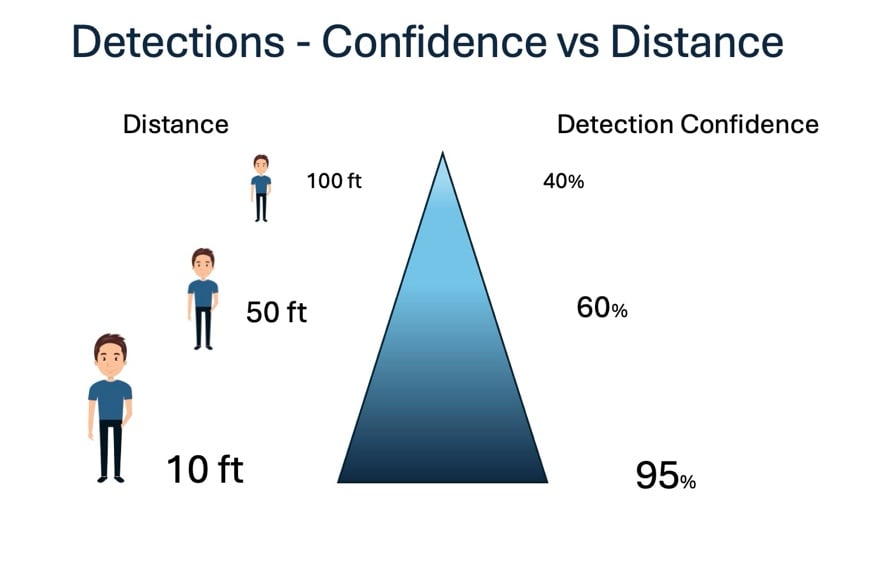
- 1080p (2MP) - general-purpose tracking
- 4-5MP - balanced clarity for people and vehicles
- 8MP (4K) - long-distance or small-object tracking
Understanding Field of View (FOV) and Focal Length
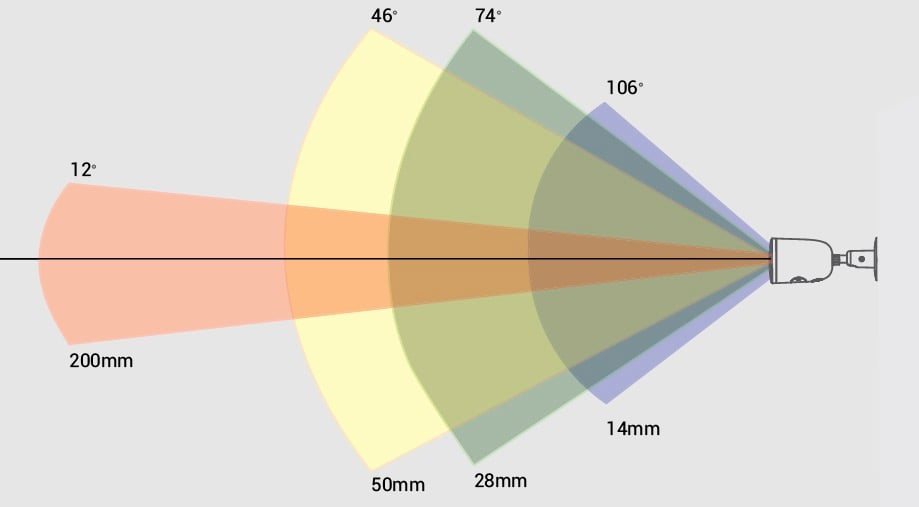
A camera’s field of view, how wide or narrow the scene appears, is driven by sensor size and lens focal length.- Wide area coverage - 2.8-4mm lens (85-100° FOV)
- Mid-range tracking - 6-8mm lens (40-60° FOV)
- Focused, long-range tracking - 12-25mm lens (15-25° FOV)
Tracking Small or Highly Detailed Objects
Verifying small parts, like on an assembly line, calls for more deliberate camera selection and placement:- Use longer focal lengths (12-25mm+) or macro-capable lenses
- Mount the camera close to the area of interest to maximize pixel density
- Use high resolution (8MP/4K+) for detailed inspection
- Ensure uniform, shadow-free lighting
- Use rigid mounting to prevent vibration or misalignment
Environmental & Mounting Considerations
- Lighting - use wide dynamic range or infrared if needed
- Mounting height - 8-12 ft for people, 12-20 ft for vehicles
- Mounting stability - avoid vibration and flexible mounting surfaces; use IP-rated cameras outdoors
Quick Reference
Rules of thumb:- Distance matters: the farther your target, the higher the resolution or longer the focal length needed
- Pixel density drives detection: ~20-40 px/ft for large objects, ~40-80 px/ft for people, 100+ px/ft for small parts or fine detail
- Lens choice defines clarity: wide (2.8-4mm) covers more area with less detail; narrow (8-25mm) covers less area with higher detail
- Resolution impacts AI confidence: 1080p for general tracking, 4-8MP for detailed analytics or distant views
- People tracking: 1080p or 4MP, 4-6mm lens, mounted 10-12 ft high
- Vehicle identification: 4MP or 8MP, 8-12mm lens, mounted 12-18 ft high
- Small tools/parts: 8MP+, 12-25mm lens, close-range, fixed position
- Large open spaces: 2.8mm wide-angle or fisheye lens