

What you’ll build
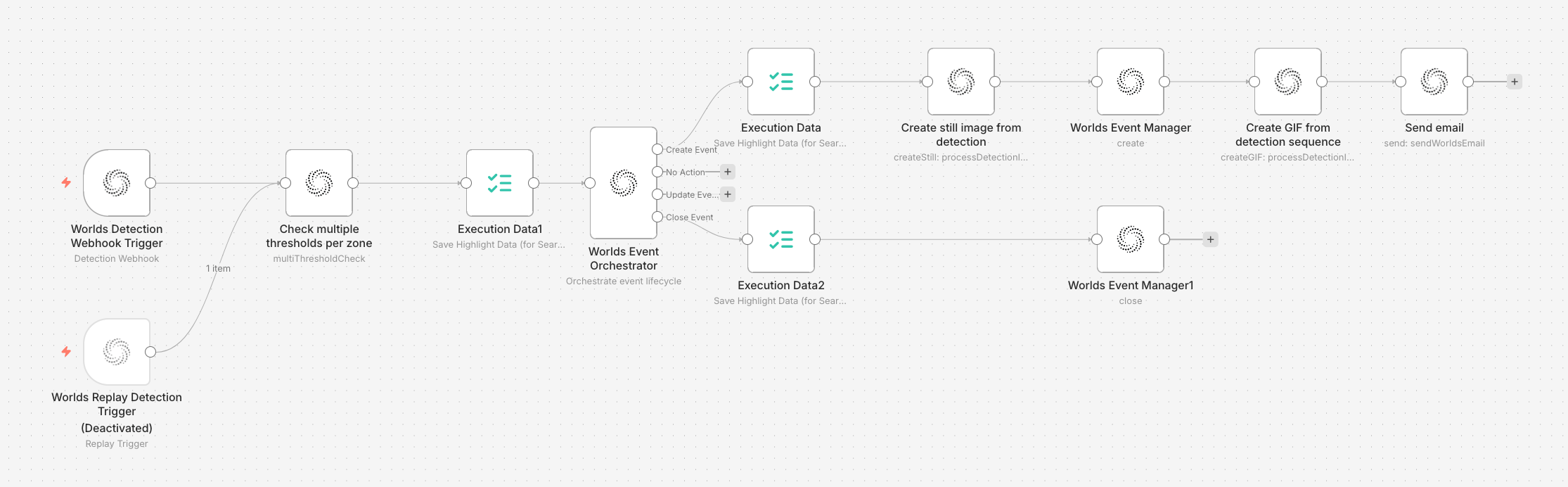
A complete Type I workflow in the Workflow Builder — trigger, check, orchestrator with create and close event paths
- Trigger receives detection data from the state machine
- Type I Check evaluates zone thresholds (intersection, dwell time, velocity)
- Event Orchestrator routes based on check results — create event, no action, update event, or close event
- Create path captures a still image, creates the event, generates a GIF, and sends an email
- Close path closes the event with duration metadata
- Replay Trigger (disabled) is available for testing with historical data
Prerequisites
- A Worlds site with configured zones
- GraphQL Subscription API credentials in the Workflow Builder
- SendGrid API credentials (for email alerts)
- The state machine running and connected to your Workflow Builder instance
Step 1: Detection Webhook Trigger
The trigger listens for detections across your cameras. Configuration:- Mode: Streaming
- Signal Type: Track State
- Site: Select your site
- Data Sources: Select the cameras you want to monitor
- Object Types: Select the object types to watch for (e.g., forklift, person, AMR)
track_created, track_updated, and track_expired signal for matching detections. Each execution carries the full track state with position, velocity, zone data, and dwell times.
Step 2: Type I Check (Track in Zone)
The check node evaluates whether the detection meets your threshold criteria. Configuration:- Site: Same site as the trigger
- Threshold Groups: Create a group with:
- Zone IDs: Select the zones you want to monitor
- Intersection: Enable, operator
>=, value10(object must overlap zone by at least 10%) - Dwell Time: Enable, operator
>=, value300(object must be in zone for 5+ minutes) - Velocity: Enable, operator
<, value5(object must be moving slowly)
checks.type1.passed (boolean) and checks.type1.matching_zones (array of zone IDs that passed) to the data.
Adapting thresholds for other use cases
Step 3: Event Orchestrator
The orchestrator reads the Type I check results and decides what to do. Configuration:- Scope Type: track (one event per tracked object)
- Scope Expression:
={{$json.track_state.track_id}}(default) - Logic Operator: AND
Step 4: Create Event path
When the orchestrator routes to “Create Event”:4a. Capture still image
Node: Worlds Actions → Process Detection Image4b. Create event in Worlds
Node: Event Manager → Create Event
Metadata — add key-value pairs for context:
4c. Generate GIF
Node: Worlds Actions → Process Detection Image → Create GIF4d. Send email alert
Node: Worlds Actions → Send Worlds EmailStep 5: Close Event path
When the orchestrator routes to “Close Event” (the track moved away or expired): Node: Event Manager → Close Event
Metadata:
How it works end-to-end
- An object enters a monitored zone
- The trigger starts receiving
track_updatedsignals - The Type I check evaluates: intersection, dwell time, velocity — fails (thresholds not yet met)
- The orchestrator routes to “No Action”
- Once thresholds are met (e.g., dwell time exceeds 300s) — passes
- The orchestrator routes to “Create Event” — image captured, event created, GIF generated, email sent
- Object continues in zone — orchestrator routes to “Update Event” (unwired, no action)
- Object leaves or track expires — checks fail → orchestrator routes to “Close Event” with duration
Other use cases for this pattern
The streaming track state pattern works for any use case where you need real-time alerting on individual track behavior:
For use cases that require zone sequences (wrong-way, checkpoint bypass), add a Type II check between the Type I check and the orchestrator. For use cases that require interaction data (near-miss, PPE), switch to the batch track state pattern instead — interactions are only available in batch mode.
Testing with Replay
- Disable the Detection Webhook Trigger
- Enable the Replay Detection Trigger
- Enter a track ID from a known event
- Run the workflow — it replays the historical detections through the same logic
- Verify the event was created and closed correctly
- The replay trigger can auto-clean events created during testing