

From camera to workflow
A single detection starts as pixels in a camera frame and ends as structured data in your workflow. Here’s what happens at each stage.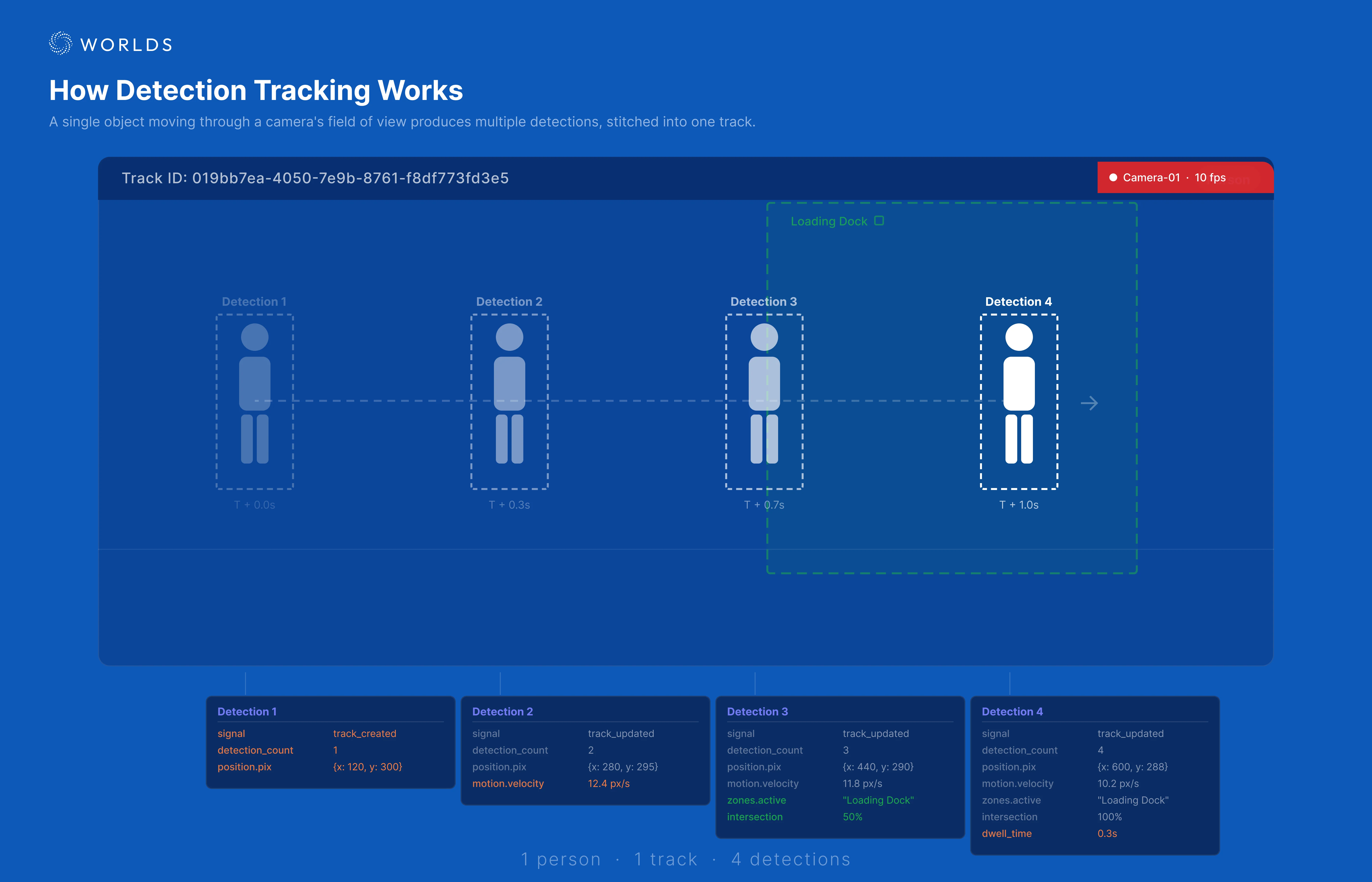
A single person walking through a camera's field of view produces multiple detections, all stitched into one track with progressively richer data.
1. Camera detection
The Worlds platform processes camera feeds using computer vision models. Each frame produces zero or more detections — identified objects with:- Bounding box — pixel coordinates of the object in the frame
- Object type (tag) — what was detected (person, forklift, AMR, etc.)
- Confidence score — how certain the model is
- Timestamp — when the frame was captured
- Geo-coordinates — if the camera is geo-calibrated
2. Detection stream
Detections are published in real time via the Worlds GraphQL API over WebSocket. A busy site with many cameras can produce hundreds of detections per second.3. State machine processing
The state machine subscribes to the detection stream and does the heavy lifting:- Track correlation — groups sequential detections of the same object into a track
- State enrichment — calculates velocity (rolling average and instantaneous), zone intersections, dwell times, and motion history
- Zone tracking — maintains active zones (where the track currently is), zone history (where it was), and zone sequence (order of zones visited)
- Signal generation — emits signals to your workflow based on the subscription’s signal type
- Streaming — emits signals in real time as detections occur. Supports both track state signals (
track_created,track_updated,track_expired) and zone state signals (zone_occupied,zone_updated,zone_empty). - Batch — collects detections and emits track summaries at a configurable interval. Only emits expired tracks, but includes interaction data — proximity and overlap between tracks calculated by interpolating bounding boxes across a 1-second window around each detection.
4. Webhook delivery
The state machine delivers signals to your workflows via HTTP webhooks. Each workflow registers a webhook URL through its trigger node. The state machine:- Matches each detection against registered subscriptions (by data source, object type, etc.)
- Delivers matching signals to the appropriate webhook URLs
- Processes detections sequentially per data source to prevent race conditions