> ## Documentation Index
> Fetch the complete documentation index at: https://docs.worlds.io/llms.txt
> Use this file to discover all available pages before exploring further.
# Streaming Track State Workflow
> Build a workflow that reacts to real-time track updates with check-based event management
The **streaming track state** pattern reacts to tracks in real time — you get an execution on every detection update, letting you alert while conditions are still developing. The trade-off is higher processing volume and the need to manage event closure when conditions clear.
This guide uses **zone intrusion** as the running example (detecting objects in restricted zones), but the same pattern applies to any streaming track use case — loitering, speeding, dwell-time monitoring, and more.
## What you'll build
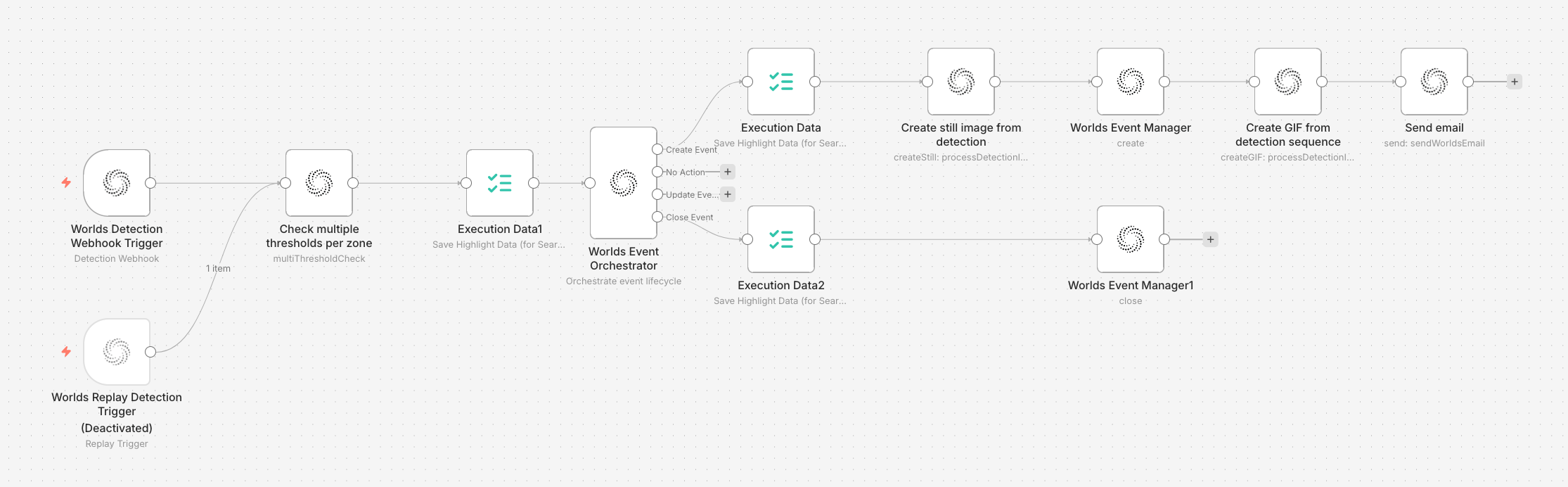 The workflow follows this structure:
* **Trigger** receives detection data from the state machine
* **Type I Check** evaluates zone thresholds (intersection, dwell time, velocity)
* **Event Orchestrator** routes based on check results — create event, no action, update event, or close event
* **Create path** captures a still image, creates the event, generates a GIF, and sends an email
* **Close path** closes the event with duration metadata
* **Replay Trigger** (disabled) is available for testing with historical data
## Prerequisites
* A Worlds site with configured zones
* GraphQL Subscription API credentials in the Workflow Builder
* SendGrid API credentials (for email alerts)
* The state machine running and connected to your Workflow Builder instance
## Step 1: Detection Webhook Trigger
The trigger listens for detections across your cameras.
**Configuration:**
* **Mode:** Streaming
* **Signal Type:** Track State
* **Site:** Select your site
* **Data Sources:** Select the cameras you want to monitor
* **Object Types:** Select the object types to watch for (e.g., forklift, person, AMR)
The trigger receives every `track_created`, `track_updated`, and `track_expired` signal for matching detections. Each execution carries the full track state with position, velocity, zone data, and dwell times.
Add a **Replay Trigger** connected to the same downstream node and keep it disabled. This lets you test the workflow with historical data at any time without modifying the live workflow.
## Step 2: Type I Check (Track in Zone)
The check node evaluates whether the detection meets your threshold criteria.
**Configuration:**
* **Site:** Same site as the trigger
* **Threshold Groups:** Create a group with:
* **Zone IDs:** Select the zones you want to monitor
* **Intersection:** Enable, operator `>=`, value `10` (object must overlap zone by at least 10%)
* **Dwell Time:** Enable, operator `>=`, value `300` (object must be in zone for 5+ minutes)
* **Velocity:** Enable, operator `<`, value `5` (object must be moving slowly)
**What happens:** For each incoming track state, the node checks every configured zone. A zone passes if the track is present with >=10% intersection, has been there >=300 seconds, and is moving below 5 px/s. If at least one zone passes, the check passes.
**Output:** Adds `checks.type1.passed` (boolean) and `checks.type1.matching_zones` (array of zone IDs that passed) to the data.
### Adapting thresholds for other use cases
| Use Case | Intersection | Dwell Time | Velocity |
| ----------------------- | ------------ | ------------ | ------------ |
| Obstruction / loitering | `>= 10%` | `>= 300s` | `< 5 px/s` |
| Zone intrusion | `>= 5%` | — (disabled) | — (disabled) |
| Speeding in zone | `>= 10%` | — (disabled) | `> 50 px/s` |
| Extended stop | `>= 20%` | `>= 600s` | `< 1 px/s` |
## Step 3: Event Orchestrator
The orchestrator reads the Type I check results and decides what to do.
**Configuration:**
* **Scope Type:** track (one event per tracked object)
* **Scope Expression:** `={{$json.track_state.track_id}}` (default)
* **Logic Operator:** AND
**Routing:**
| Output | Wired to | When |
| -------------------- | ------------------------------------------- | --------------------------------------- |
| **Create Event** (0) | Image capture + Event Manager + GIF + Email | First time checks pass for this track |
| **No Action** (1) | Nothing | Checks don't pass, no active event |
| **Update Event** (2) | Nothing (in this workflow) | Checks still pass, event already exists |
| **Close Event** (3) | Event Manager (close) | Checks no longer pass, event exists |
## Step 4: Create Event path
When the orchestrator routes to "Create Event":
### 4a. Capture still image
**Node:** Worlds Actions → Process Detection Image
| Parameter | Value |
| ------------- | ------------------------------------------- |
| **Track IDs** | `={{$json.track_state.track_id}}` |
| **Timestamp** | `={{$json.track_state.last_seen}}` |
| **Zone IDs** | `={{$json.checks.type1.matching_zones[0]}}` |
### 4b. Create event in Worlds
**Node:** Event Manager → Create Event
| Parameter | Value |
| ------------------ | -------------------------------------------------------------- |
| **Event Producer** | Select your event producer |
| **Event Type** | Your event category (e.g., "Operational", "Safety") |
| **Event Subtype** | Descriptive name (e.g., "Obstruction Event", "Zone Intrusion") |
| **Start Time** | `={{$json.track_state.last_seen}}` |
| **Track IDs** | `={{$json.track_state.track_id}}` |
**Metadata** — add key-value pairs for context:
| Key | Value |
| -------------- | ---------------------------------------------------------------------------------------------------- |
| trackId | `={{$json.track_state.track_id}}` |
| dataSourceID | `={{$json.track_state.datasource_id}}` |
| dataSourceName | `={{$json.track_state.datasource_name}}` |
| tag | `={{$json.track_state.tag}}` |
| position | `=({{$json.track_state.position.geo.lat ?? 'NaN'}},{{$json.track_state.position.geo.lon ?? 'NaN'}})` |
| source | `={{$workflow.id}}` |
### 4c. Generate GIF
**Node:** Worlds Actions → Process Detection Image → Create GIF
| Parameter | Value |
| ------------- | ---------------------------------- |
| **Track IDs** | `={{$json.track_state.track_id}}` |
| **Timestamp** | `={{$json.track_state.last_seen}}` |
### 4d. Send email alert
**Node:** Worlds Actions → Send Worlds Email
| Parameter | Value |
| ------------------- | ---------------------------------------- |
| **Email Subject** | Your alert subject |
| **Alert Image** | `={{$json.gif_base64}}` |
| **Alert Title** | Your alert title |
| **Site Name** | `={{$json.track_state.site_name}}` |
| **Event Timestamp** | `={{$json.createdEvent.startTime}}` |
| **Camera Name** | `={{$json.track_state.datasource_name}}` |
| **Event ID** | `={{$json.createdEvent.id}}` |
| **To Recipients** | Your alert distribution list |
## Step 5: Close Event path
When the orchestrator routes to "Close Event" (the track moved away or expired):
**Node:** Event Manager → Close Event
| Parameter | Value |
| ------------ | ---------------------------------------------- |
| **Event ID** | `={{$json.eventOrchestrator.global_event_id}}` |
| **End Time** | `={{$json.track_state.last_seen}}` |
**Metadata:**
| Key | Value |
| -------- | ---------------------------------------------------------------------------------------------------------------------- |
| duration | `={{Math.round((new Date($json.track_state.last_seen) - new Date($json.eventOrchestrator.event_start_time)) / 1000)}}` |
## How it works end-to-end
1. An object enters a monitored zone
2. The trigger starts receiving `track_updated` signals
3. The Type I check evaluates: intersection, dwell time, velocity — **fails** (thresholds not yet met)
4. The orchestrator routes to "No Action"
5. Once thresholds are met (e.g., dwell time exceeds 300s) — **passes**
6. The orchestrator routes to "Create Event" — image captured, event created, GIF generated, email sent
7. Object continues in zone — orchestrator routes to "Update Event" (unwired, no action)
8. Object leaves or track expires — checks fail → orchestrator routes to "Close Event" with duration
## Other use cases for this pattern
The streaming track state pattern works for any use case where you need real-time alerting on individual track behavior:
| Use Case | Check Differences | Key Difference |
| ------------------------- | --------------------------------------------- | ------------------------------------------------------------ |
| **Loitering** | Type I: higher dwell time threshold | Same as zone intrusion but with stricter dwell requirements. |
| **Speeding in zone** | Type I: velocity `>` threshold, no dwell time | Inverted velocity check — fires when objects move too fast. |
| **Dwell time monitoring** | Type I: dwell time only, no velocity | Simpler threshold configuration. |
| **Extended vehicle stop** | Type I: high dwell + low velocity | Similar to obstruction but with real-time alerting. |
For use cases that require **zone sequences** (wrong-way, checkpoint bypass), add a Type II check between the Type I check and the orchestrator. For use cases that require **interaction data** (near-miss, PPE), switch to the [batch track state pattern](/guides/batch-track-state) instead — interactions are only available in batch mode.
## Testing with Replay
1. Disable the Detection Webhook Trigger
2. Enable the Replay Detection Trigger
3. Enter a track ID from a known event
4. Run the workflow — it replays the historical detections through the same logic
5. Verify the event was created and closed correctly
6. The replay trigger can auto-clean events created during testing
The workflow follows this structure:
* **Trigger** receives detection data from the state machine
* **Type I Check** evaluates zone thresholds (intersection, dwell time, velocity)
* **Event Orchestrator** routes based on check results — create event, no action, update event, or close event
* **Create path** captures a still image, creates the event, generates a GIF, and sends an email
* **Close path** closes the event with duration metadata
* **Replay Trigger** (disabled) is available for testing with historical data
## Prerequisites
* A Worlds site with configured zones
* GraphQL Subscription API credentials in the Workflow Builder
* SendGrid API credentials (for email alerts)
* The state machine running and connected to your Workflow Builder instance
## Step 1: Detection Webhook Trigger
The trigger listens for detections across your cameras.
**Configuration:**
* **Mode:** Streaming
* **Signal Type:** Track State
* **Site:** Select your site
* **Data Sources:** Select the cameras you want to monitor
* **Object Types:** Select the object types to watch for (e.g., forklift, person, AMR)
The trigger receives every `track_created`, `track_updated`, and `track_expired` signal for matching detections. Each execution carries the full track state with position, velocity, zone data, and dwell times.
Add a **Replay Trigger** connected to the same downstream node and keep it disabled. This lets you test the workflow with historical data at any time without modifying the live workflow.
## Step 2: Type I Check (Track in Zone)
The check node evaluates whether the detection meets your threshold criteria.
**Configuration:**
* **Site:** Same site as the trigger
* **Threshold Groups:** Create a group with:
* **Zone IDs:** Select the zones you want to monitor
* **Intersection:** Enable, operator `>=`, value `10` (object must overlap zone by at least 10%)
* **Dwell Time:** Enable, operator `>=`, value `300` (object must be in zone for 5+ minutes)
* **Velocity:** Enable, operator `<`, value `5` (object must be moving slowly)
**What happens:** For each incoming track state, the node checks every configured zone. A zone passes if the track is present with >=10% intersection, has been there >=300 seconds, and is moving below 5 px/s. If at least one zone passes, the check passes.
**Output:** Adds `checks.type1.passed` (boolean) and `checks.type1.matching_zones` (array of zone IDs that passed) to the data.
### Adapting thresholds for other use cases
| Use Case | Intersection | Dwell Time | Velocity |
| ----------------------- | ------------ | ------------ | ------------ |
| Obstruction / loitering | `>= 10%` | `>= 300s` | `< 5 px/s` |
| Zone intrusion | `>= 5%` | — (disabled) | — (disabled) |
| Speeding in zone | `>= 10%` | — (disabled) | `> 50 px/s` |
| Extended stop | `>= 20%` | `>= 600s` | `< 1 px/s` |
## Step 3: Event Orchestrator
The orchestrator reads the Type I check results and decides what to do.
**Configuration:**
* **Scope Type:** track (one event per tracked object)
* **Scope Expression:** `={{$json.track_state.track_id}}` (default)
* **Logic Operator:** AND
**Routing:**
| Output | Wired to | When |
| -------------------- | ------------------------------------------- | --------------------------------------- |
| **Create Event** (0) | Image capture + Event Manager + GIF + Email | First time checks pass for this track |
| **No Action** (1) | Nothing | Checks don't pass, no active event |
| **Update Event** (2) | Nothing (in this workflow) | Checks still pass, event already exists |
| **Close Event** (3) | Event Manager (close) | Checks no longer pass, event exists |
## Step 4: Create Event path
When the orchestrator routes to "Create Event":
### 4a. Capture still image
**Node:** Worlds Actions → Process Detection Image
| Parameter | Value |
| ------------- | ------------------------------------------- |
| **Track IDs** | `={{$json.track_state.track_id}}` |
| **Timestamp** | `={{$json.track_state.last_seen}}` |
| **Zone IDs** | `={{$json.checks.type1.matching_zones[0]}}` |
### 4b. Create event in Worlds
**Node:** Event Manager → Create Event
| Parameter | Value |
| ------------------ | -------------------------------------------------------------- |
| **Event Producer** | Select your event producer |
| **Event Type** | Your event category (e.g., "Operational", "Safety") |
| **Event Subtype** | Descriptive name (e.g., "Obstruction Event", "Zone Intrusion") |
| **Start Time** | `={{$json.track_state.last_seen}}` |
| **Track IDs** | `={{$json.track_state.track_id}}` |
**Metadata** — add key-value pairs for context:
| Key | Value |
| -------------- | ---------------------------------------------------------------------------------------------------- |
| trackId | `={{$json.track_state.track_id}}` |
| dataSourceID | `={{$json.track_state.datasource_id}}` |
| dataSourceName | `={{$json.track_state.datasource_name}}` |
| tag | `={{$json.track_state.tag}}` |
| position | `=({{$json.track_state.position.geo.lat ?? 'NaN'}},{{$json.track_state.position.geo.lon ?? 'NaN'}})` |
| source | `={{$workflow.id}}` |
### 4c. Generate GIF
**Node:** Worlds Actions → Process Detection Image → Create GIF
| Parameter | Value |
| ------------- | ---------------------------------- |
| **Track IDs** | `={{$json.track_state.track_id}}` |
| **Timestamp** | `={{$json.track_state.last_seen}}` |
### 4d. Send email alert
**Node:** Worlds Actions → Send Worlds Email
| Parameter | Value |
| ------------------- | ---------------------------------------- |
| **Email Subject** | Your alert subject |
| **Alert Image** | `={{$json.gif_base64}}` |
| **Alert Title** | Your alert title |
| **Site Name** | `={{$json.track_state.site_name}}` |
| **Event Timestamp** | `={{$json.createdEvent.startTime}}` |
| **Camera Name** | `={{$json.track_state.datasource_name}}` |
| **Event ID** | `={{$json.createdEvent.id}}` |
| **To Recipients** | Your alert distribution list |
## Step 5: Close Event path
When the orchestrator routes to "Close Event" (the track moved away or expired):
**Node:** Event Manager → Close Event
| Parameter | Value |
| ------------ | ---------------------------------------------- |
| **Event ID** | `={{$json.eventOrchestrator.global_event_id}}` |
| **End Time** | `={{$json.track_state.last_seen}}` |
**Metadata:**
| Key | Value |
| -------- | ---------------------------------------------------------------------------------------------------------------------- |
| duration | `={{Math.round((new Date($json.track_state.last_seen) - new Date($json.eventOrchestrator.event_start_time)) / 1000)}}` |
## How it works end-to-end
1. An object enters a monitored zone
2. The trigger starts receiving `track_updated` signals
3. The Type I check evaluates: intersection, dwell time, velocity — **fails** (thresholds not yet met)
4. The orchestrator routes to "No Action"
5. Once thresholds are met (e.g., dwell time exceeds 300s) — **passes**
6. The orchestrator routes to "Create Event" — image captured, event created, GIF generated, email sent
7. Object continues in zone — orchestrator routes to "Update Event" (unwired, no action)
8. Object leaves or track expires — checks fail → orchestrator routes to "Close Event" with duration
## Other use cases for this pattern
The streaming track state pattern works for any use case where you need real-time alerting on individual track behavior:
| Use Case | Check Differences | Key Difference |
| ------------------------- | --------------------------------------------- | ------------------------------------------------------------ |
| **Loitering** | Type I: higher dwell time threshold | Same as zone intrusion but with stricter dwell requirements. |
| **Speeding in zone** | Type I: velocity `>` threshold, no dwell time | Inverted velocity check — fires when objects move too fast. |
| **Dwell time monitoring** | Type I: dwell time only, no velocity | Simpler threshold configuration. |
| **Extended vehicle stop** | Type I: high dwell + low velocity | Similar to obstruction but with real-time alerting. |
For use cases that require **zone sequences** (wrong-way, checkpoint bypass), add a Type II check between the Type I check and the orchestrator. For use cases that require **interaction data** (near-miss, PPE), switch to the [batch track state pattern](/guides/batch-track-state) instead — interactions are only available in batch mode.
## Testing with Replay
1. Disable the Detection Webhook Trigger
2. Enable the Replay Detection Trigger
3. Enter a track ID from a known event
4. Run the workflow — it replays the historical detections through the same logic
5. Verify the event was created and closed correctly
6. The replay trigger can auto-clean events created during testing