> ## Documentation Index
> Fetch the complete documentation index at: https://docs.worlds.io/llms.txt
> Use this file to discover all available pages before exploring further.
# Detection Pipeline
> How detection data flows from cameras through the state machine to your workflows
## From camera to workflow
A single detection starts as pixels in a camera frame and ends as structured data in your workflow. Here's what happens at each stage.
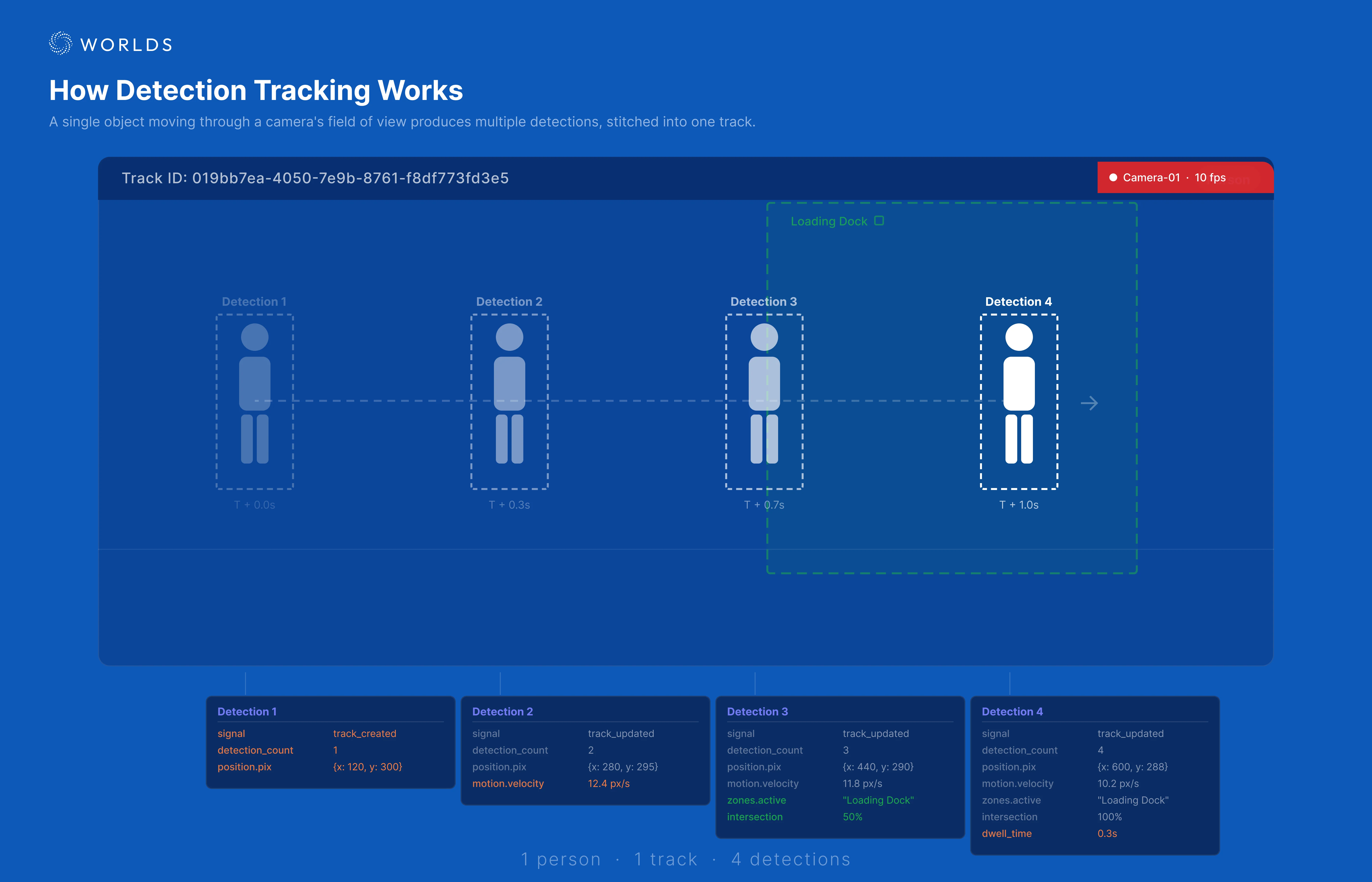 ### 1. Camera detection
The Worlds platform processes camera feeds using computer vision models. Each frame produces zero or more **detections** — identified objects with:
* **Bounding box** — pixel coordinates of the object in the frame
* **Object type (tag)** — what was detected (person, forklift, AMR, etc.)
* **Confidence score** — how certain the model is
* **Timestamp** — when the frame was captured
* **Geo-coordinates** — if the camera is geo-calibrated
### 2. Detection stream
Detections are published in real time via the Worlds GraphQL API over WebSocket. A busy site with many cameras can produce hundreds of detections per second.
### 3. State machine processing
The state machine subscribes to the detection stream and does the heavy lifting:
* **Track correlation** — groups sequential detections of the same object into a **track**
* **State enrichment** — calculates velocity (rolling average and instantaneous), zone intersections, dwell times, and motion history
* **Zone tracking** — maintains active zones (where the track currently is), zone history (where it was), and zone sequence (order of zones visited)
* **Signal generation** — emits signals to your workflow based on the subscription's signal type
The state machine operates in two modes:
* **Streaming** — emits signals in real time as detections occur. Supports both **track state** signals (`track_created`, `track_updated`, `track_expired`) and **zone state** signals (`zone_occupied`, `zone_updated`, `zone_empty`).
* **Batch** — collects detections and emits track summaries at a configurable interval. Only emits expired tracks, but includes **interaction data** — proximity and overlap between tracks calculated by interpolating bounding boxes across a 1-second window around each detection.
Each signal includes the complete enriched state — your workflow never needs to query for additional data.
### 4. Webhook delivery
The state machine delivers signals to your workflows via HTTP webhooks. Each workflow registers a webhook URL through its trigger node. The state machine:
* Matches each detection against registered subscriptions (by data source, object type, etc.)
* Delivers matching signals to the appropriate webhook URLs
* Processes detections **sequentially per data source** to prevent race conditions
### 5. Workflow execution
Your workflow receives the enriched state and runs your business logic. A single workflow execution handles one signal — either one track state update or one zone state update. The purpose of the workflow is to **distill high-volume detection data into actionable events** on the Worlds platform.
The typical workflow pattern is: **Trigger → Check → Event Orchestrator → Action** (image capture, event creation, email alert).
## Data flow example
Here's a concrete example of a forklift being tracked:
```
Frame 1: Forklift detected at (500, 300) in camera "Loading Dock A"
Frame 2: Same forklift at (502, 301) — correlated to same track
Frame 3: Forklift at (503, 301) — enters Zone "Loading Bay 1"
...
Frame 900: Forklift still at (505, 302) — dwell time now 300s, velocity ~0.1 px/s
```
By frame 900, the state machine has built a rich track state object:
```json theme={null}
{
"signal": "track_updated",
"track_state": {
"track_id": "019bb7ea-4050-...",
"tag": "forklift",
"datasource_name": "Loading Dock A",
"motion": {
"pix": { "velocity": 0.1, "distance": 12.5 }
},
"zones": {
"active": {
"42": {
"zone_name": "Loading Bay 1",
"dwell_time": 300,
"intersection": { "current_percent": 85.2 }
}
}
}
}
}
```
Your workflow receives this and can apply a Type I check: "Is this forklift in Loading Bay 1, with dwell > 300s, velocity \< 2 px/s?" If yes, create an event.
### 1. Camera detection
The Worlds platform processes camera feeds using computer vision models. Each frame produces zero or more **detections** — identified objects with:
* **Bounding box** — pixel coordinates of the object in the frame
* **Object type (tag)** — what was detected (person, forklift, AMR, etc.)
* **Confidence score** — how certain the model is
* **Timestamp** — when the frame was captured
* **Geo-coordinates** — if the camera is geo-calibrated
### 2. Detection stream
Detections are published in real time via the Worlds GraphQL API over WebSocket. A busy site with many cameras can produce hundreds of detections per second.
### 3. State machine processing
The state machine subscribes to the detection stream and does the heavy lifting:
* **Track correlation** — groups sequential detections of the same object into a **track**
* **State enrichment** — calculates velocity (rolling average and instantaneous), zone intersections, dwell times, and motion history
* **Zone tracking** — maintains active zones (where the track currently is), zone history (where it was), and zone sequence (order of zones visited)
* **Signal generation** — emits signals to your workflow based on the subscription's signal type
The state machine operates in two modes:
* **Streaming** — emits signals in real time as detections occur. Supports both **track state** signals (`track_created`, `track_updated`, `track_expired`) and **zone state** signals (`zone_occupied`, `zone_updated`, `zone_empty`).
* **Batch** — collects detections and emits track summaries at a configurable interval. Only emits expired tracks, but includes **interaction data** — proximity and overlap between tracks calculated by interpolating bounding boxes across a 1-second window around each detection.
Each signal includes the complete enriched state — your workflow never needs to query for additional data.
### 4. Webhook delivery
The state machine delivers signals to your workflows via HTTP webhooks. Each workflow registers a webhook URL through its trigger node. The state machine:
* Matches each detection against registered subscriptions (by data source, object type, etc.)
* Delivers matching signals to the appropriate webhook URLs
* Processes detections **sequentially per data source** to prevent race conditions
### 5. Workflow execution
Your workflow receives the enriched state and runs your business logic. A single workflow execution handles one signal — either one track state update or one zone state update. The purpose of the workflow is to **distill high-volume detection data into actionable events** on the Worlds platform.
The typical workflow pattern is: **Trigger → Check → Event Orchestrator → Action** (image capture, event creation, email alert).
## Data flow example
Here's a concrete example of a forklift being tracked:
```
Frame 1: Forklift detected at (500, 300) in camera "Loading Dock A"
Frame 2: Same forklift at (502, 301) — correlated to same track
Frame 3: Forklift at (503, 301) — enters Zone "Loading Bay 1"
...
Frame 900: Forklift still at (505, 302) — dwell time now 300s, velocity ~0.1 px/s
```
By frame 900, the state machine has built a rich track state object:
```json theme={null}
{
"signal": "track_updated",
"track_state": {
"track_id": "019bb7ea-4050-...",
"tag": "forklift",
"datasource_name": "Loading Dock A",
"motion": {
"pix": { "velocity": 0.1, "distance": 12.5 }
},
"zones": {
"active": {
"42": {
"zone_name": "Loading Bay 1",
"dwell_time": 300,
"intersection": { "current_percent": 85.2 }
}
}
}
}
}
```
Your workflow receives this and can apply a Type I check: "Is this forklift in Loading Bay 1, with dwell > 300s, velocity \< 2 px/s?" If yes, create an event.